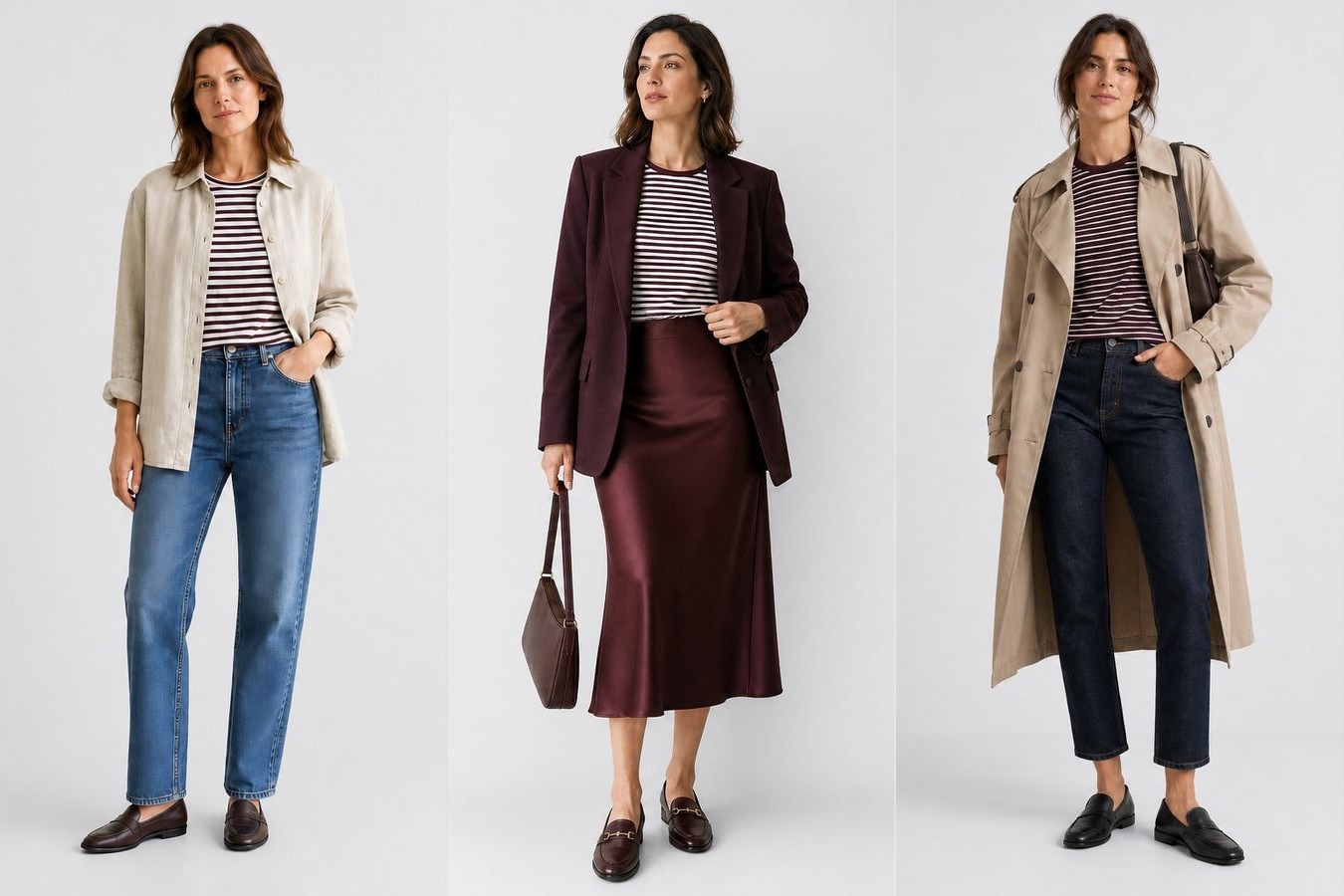
How do you make the same creative feel relevant to every customer, in every season, and in every market?
In this article
Open the live Market Lens demo — a localized PDP prototype that routes traffic from 27 markets through six fashion-culture archetypes, then applies a seasonal hero treatment while keeping the same SKU, price, and checkout flow. Below we show one €12.99 striped T-shirt restyled nine ways across France, Poland, and Denmark.
- Why market and season should change PDP styling
- How traffic routes to a fashion-culture archetype before season is applied
- A 3 × 3 styling matrix — three countries, three seasons, one garment
- Why nine looks per SKU breaks the traditional shoot model
- How AI keeps the product accurate while restyling everything around it
A summer shopper should see the T-shirt with a skirt and trainers. A winter shopper should see it under a coat with boots. A shopper in Paris should see a different look from a shopper in Warsaw or Copenhagen — not because the product changes, but because the styling, model, and layers around it do.
Why one styling does not fit every visit
Product page imagery is how shoppers judge fit, proportion, and wearability before they buy. Baymard Institute usability testing found that apparel needs a human model for shoppers to assess fit and length at all, and that 42% of users try to work out a product's scale from its images. Baymard also reports that 28% of major e-commerce sites fail to provide a single in-scale image even for their best-selling products.
When the styling feels wrong, the cost shows up in returns. Coresight Research estimated the average US online apparel return rate at 24.4%, with size and fit cited by 53% of surveyed brands and retailers. Loop Returns attributes 25% of apparel returns to style and preference — the shopper simply did not want the item once it arrived. That gap sits between how the page styled the product and how the shopper imagined wearing it.
Same garment. Different season. Different country. Different model. The product never changes — only the styling around it.
How Market Lens routes one SKU across markets
The zalando-demo.flixstock.com prototype shows how localized PDP imagery can work at scale:
- Detect market — storefront, campaign, or traffic signal (e.g. FR, PL, DK).
- Route to an archetype — one of six fashion-culture systems shared across 27 markets.
- Apply season — Summer, Transitional, or Winter selects the current hero treatment.
- Preserve commerce — same product, price, size selector, and purchase flow.
| Market | Fashion-culture archetype | Creative direction |
|---|---|---|
| France | Refined Effortlessness | Soft tailoring, relaxed polish, effortless proportion |
| Poland | Elevated Presentation | Aspirational finish, sharper lines, elevated presentation |
| Denmark | Quiet Functional Luxury | Understated quality, functional luxury, calm minimalism |
Three countries multiplied by three seasons equals nine styled looks for a single SKU. Scale that across a catalogue and the photoshoot math breaks down. That is the production problem FlixStock is built to solve.
One T-shirt, three countries, three seasons
The matrix below uses live outputs from Market Lens. Read across a row to see how one country dresses the same T-shirt through the year. Read down a column to compare how one season reads in three different markets.
| Country | Summer | Transitional | Winter |
|---|---|---|---|
| France · Refined Effortlessness | 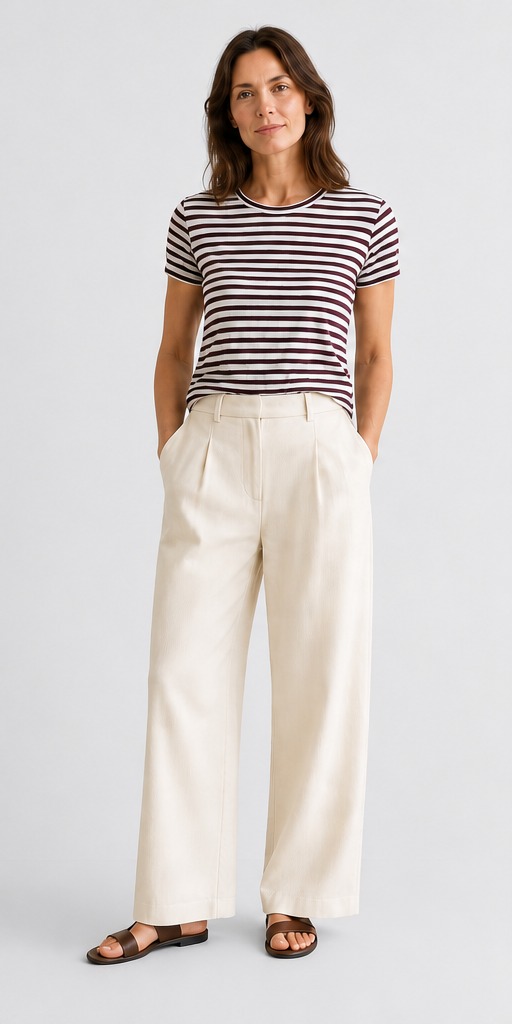 Cream wide-leg trousers, brown slide sandals. Cream wide-leg trousers, brown slide sandals. |
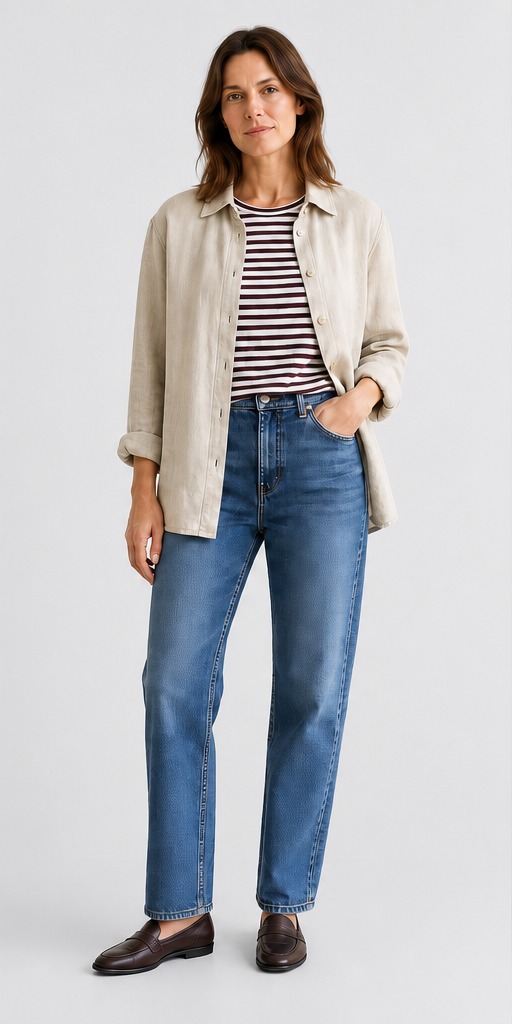 Open linen shirt, straight jeans, brown loafers. Open linen shirt, straight jeans, brown loafers. |
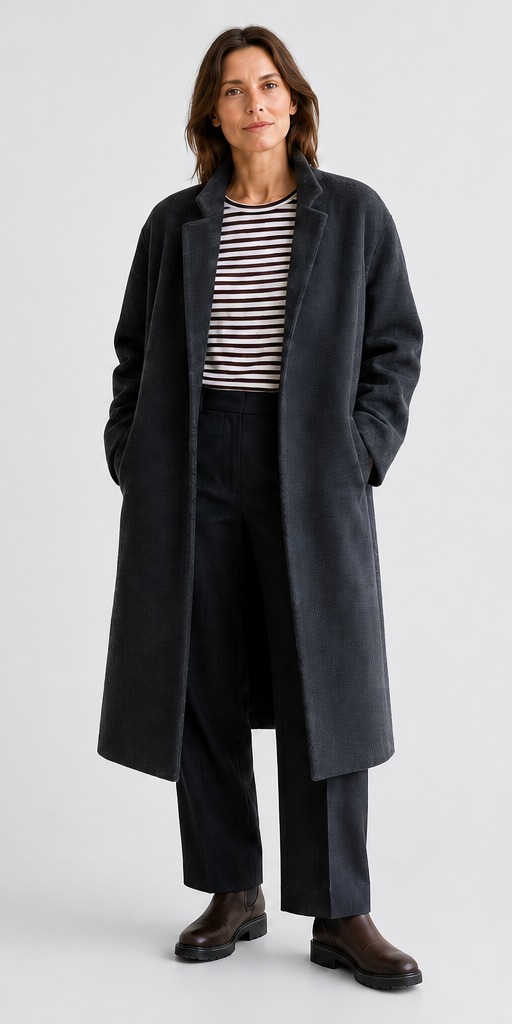 Charcoal textured coat, tailored trousers, lug-sole boots. Charcoal textured coat, tailored trousers, lug-sole boots. |
| Poland · Elevated Presentation | 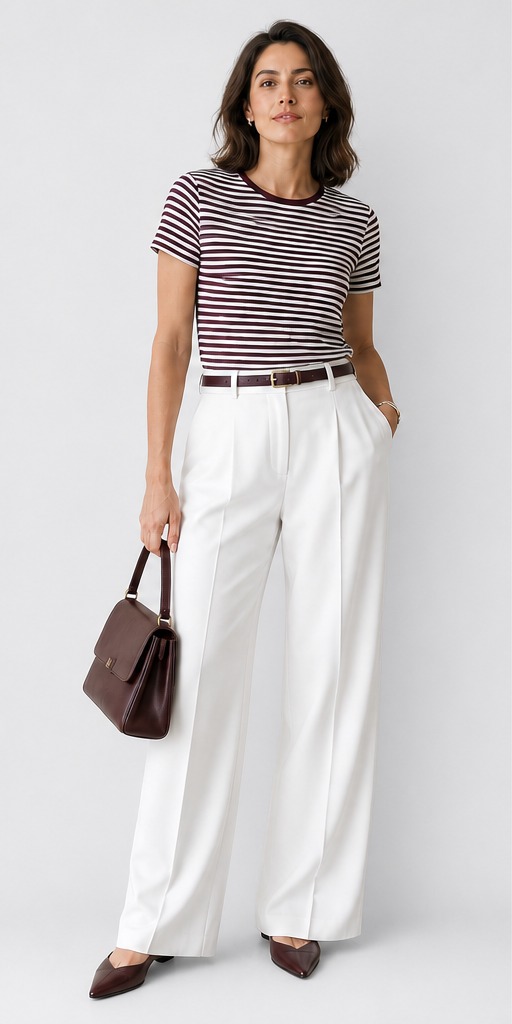 White wide-leg trousers, burgundy belt, pointed flats, structured bag. White wide-leg trousers, burgundy belt, pointed flats, structured bag. |
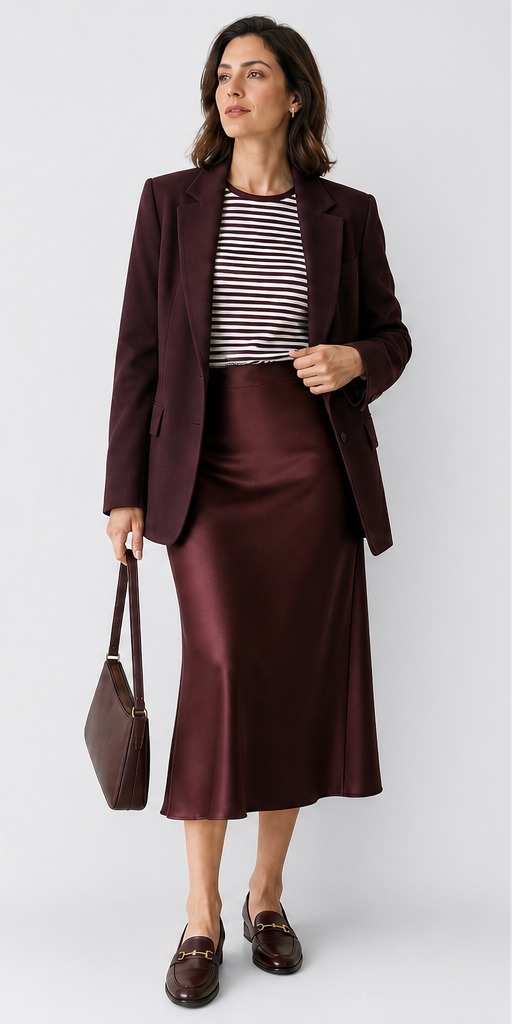 Burgundy satin blazer, matching midi skirt, horsebit loafers. Burgundy satin blazer, matching midi skirt, horsebit loafers. |
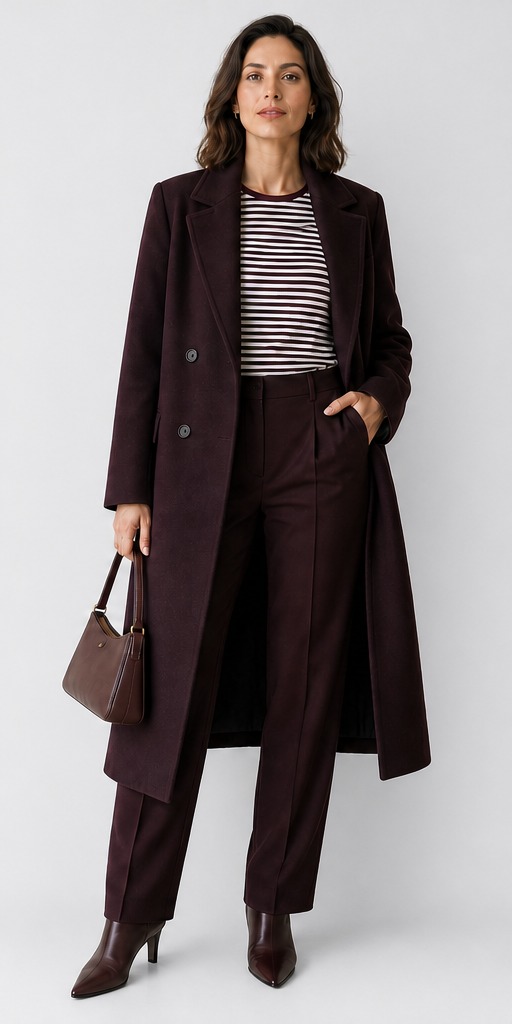 Double-breasted wool coat, pleated trousers, pointed boots. Double-breasted wool coat, pleated trousers, pointed boots. |
| Denmark · Quiet Functional Luxury | 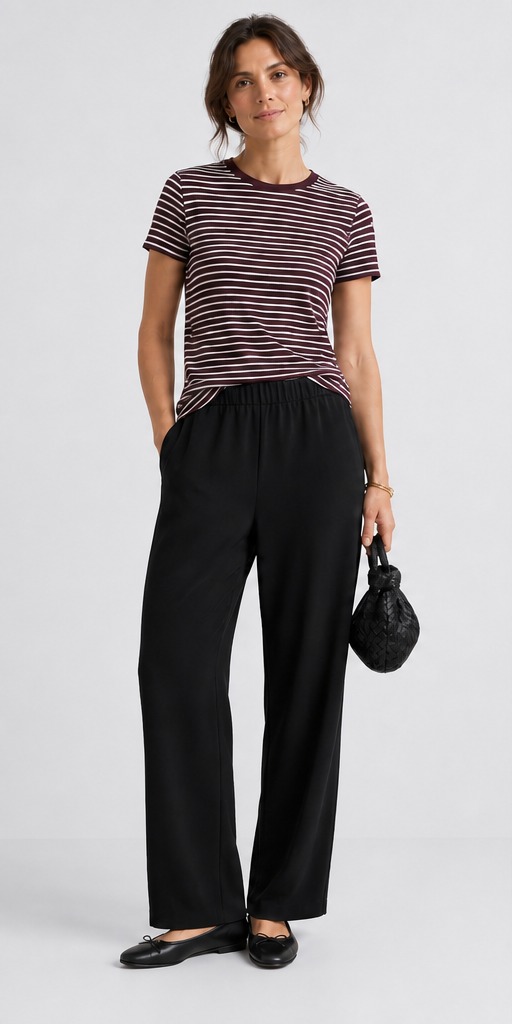 Black wide-leg trousers, ballet flats, woven leather pouch. Black wide-leg trousers, ballet flats, woven leather pouch. |
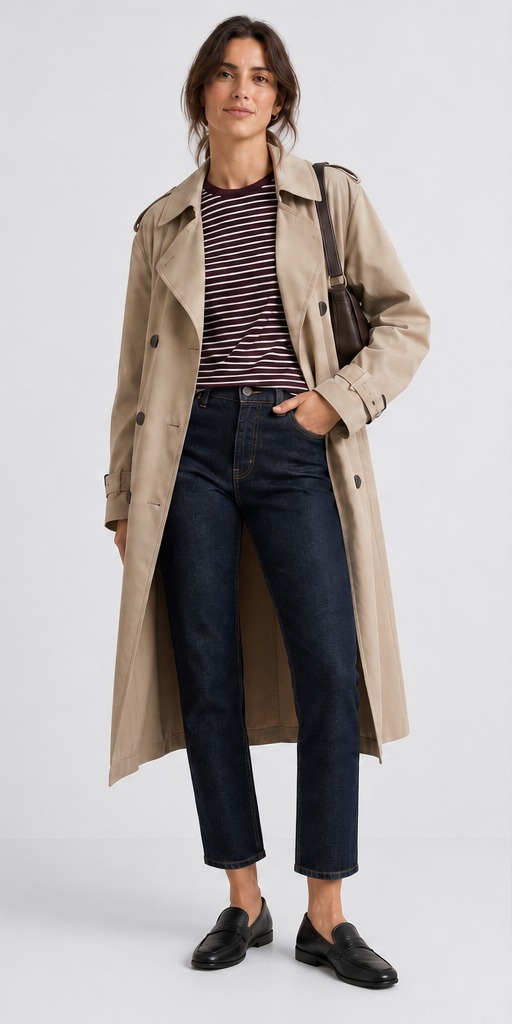 Tan trench coat, dark jeans, black loafers. Tan trench coat, dark jeans, black loafers. |
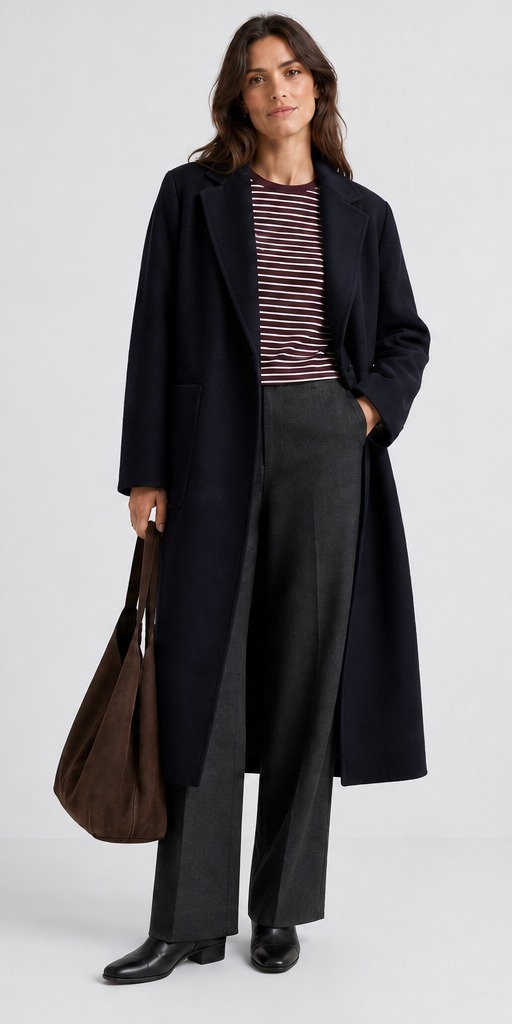 Navy wool coat, charcoal pleated trousers, ankle boots, suede tote. Navy wool coat, charcoal pleated trousers, ankle boots, suede tote. |
In every cell, the striped T-shirt is the same €12.99 SKU. Across a row, the wardrobe shifts with the weather. Down a column, the same season reads differently in three countries — different model, different bottoms, different outerwear, different shoes.
Try it live: open zalando-demo.flixstock.com, switch Traffic from and Season in the header, and watch the hero image update while the product data stays fixed.
Why you cannot shoot your way to nine looks per SKU
Nine styled photographs per product sounds manageable until you multiply it. A 5,000-SKU catalogue needs 45,000 styled hero images for three countries and three seasons alone. Add a fourth market, a second body type, or a festive styling window and the number climbs again. Every new season means rebooking models, restyling wardrobes, and reshooting looks that were only relevant for twelve weeks.
Most teams respond by shooting one look and publishing it everywhere. The image works for one moment in one market and feels off everywhere else. The constraint was never creative ambition — it was studio capacity.
How AI restyles the look without touching the garment
FlixStock starts with the original product photograph and generates the styled variations around it. The AI does not redesign the T-shirt. It keeps the cut, colour, and print locked to the source shot. What it builds is everything else: the trousers or skirt, the coat, the shoes, the bag, and the model wearing them.
A new country or a new season becomes a rendering pass, not a shoot day. The nine looks in the matrix above all came from one source product photo — no separate booking for French summer, Polish transitional, or Danish winter. One image in, nine styled outputs out.
The production model is simple: the garment stays accurate, and the context around it adapts. If the rendered product drifts from the real one, shoppers get an expectation gap — Coresight Research found colour mismatch behind 16% of apparel returns in its surveyed data. Keeping the source garment fixed is what makes the styling trustworthy.
How to test seasonal styling before scaling it
The mistake is generating nine treatments for every SKU before knowing whether any of them move a metric. Start narrower:
- Pick twenty high-traffic products in categories where styling matters most — basics, knitwear, layering pieces, and outerwear.
- Use AI to generate two styled versions for one season in one country. Keep the global studio shot as the control.
- Split by market at the storefront level so each visitor sees one consistent styling.
- Measure add-to-cart rate and return reason codes. If styling is working, the style-and-preference share of returns should move before raw conversion does.
- Only extend to the remaining seasons and countries after one market shows a signal.
To explore every market and season combination, use the demo linked above: select a country and season in the controls and watch the same T-shirt restyle in place.
Frequently asked questions
What is seasonal product styling on a product page?
It means showing the same garment dressed for the weather the shopper is currently in. A T-shirt appears with a skirt and sandals in summer, under a blazer in autumn, and beneath a coat with boots in winter. The product itself does not change — only the outfit, the model, and the layers around it.
How does AI restyle a product without changing the garment?
AI reads the original product photograph and keeps the garment's cut, colour, and print fixed. It then generates the surrounding outfit — bottoms, outerwear, footwear, accessories — and places the product on a model styled for the target season and market. The striped T-shirt in the matrix below never changes between the nine looks.
Why does styling change by country if the product is identical?
Because dress habits vary by market. Tailored trousers and loafers read differently from a cargo skirt and chunky trainers. A look that feels natural in Copenhagen may feel out of place in Warsaw or Paris. Changing the model and the styling language helps shoppers in each country picture the product in their own wardrobe.
Can you create summer and winter looks from one product photo?
Yes — that is what the matrix below shows. FlixStock generated all nine country-and-season variations from a single source product photo. Summer gets lighter layers and open footwear. Winter gets coats, scarves, and boots. The garment itself stays the same throughout.
How is AI styling different from a traditional fashion photoshoot?
A traditional shoot produces one look per booking — one model, one outfit, one season. AI styling produces multiple looks from the same source image: different countries, different seasons, different models, without rebooking a studio, restyling a wardrobe, or reshooting when the weather changes. The trade-off to manage is accuracy — the generated garment must match the real product, or returns rise.
References
- Baymard Institute, Provide Images of Accessory, Apparel, and Cosmetic Products on a Human Model (2025)
- Baymard Institute, 5 UX Best Practices for Apparel E-Commerce — 90% Get One or More Wrong (2025)
- Baymard Institute, Product Page UX: Provide at Least One "In Scale" Image (2025)
- Coresight Research, The True Cost of Apparel Returns (2023)
- Loop Returns, Most Common Return Reasons in Ecommerce by Vertical (2026)